Developer Guide
AbsolutSin-ema Developer Guide
AbsolutSin-ema is a desktop application for party planners to manage contacts and events efficiently. It is optimized for use via a Command Line Interface (CLI) while still having the benefits of a Graphical User Interface (GUI). This guide provides comprehensive documentation for developers who wish to understand, maintain, or extend AbsolutSin-ema.
AbsolutSin-ema is an address book that is designed for party planners across all experience levels — from student organizers and hall committees to freelance coordinators and professional event teams. It serves individuals who manage guests, suppliers, and logistics, and who value fast, organized, and command-driven workflows that streamline event planning and communication.
Table of Contents
- Acknowledgements
- Setting up, getting started
- Design
- Component Details
- Implementation
- Documentation, logging, testing, configuration, dev-ops
- Appendix: Requirements
- Appendix: Instructions for manual testing
- Appendix: Effort
Acknowledgements
- This project is based on the AddressBook-Level3 project created by the SE-EDU initiative
- JavaFX library for GUI components
- Jackson library for JSON serialization/deserialization
- JUnit5 for testing framework
Setting up, getting started
Refer to the guide Setting up and getting started.
Design
.puml files used to create diagrams are in this document docs/diagrams folder. Refer to the PlantUML Tutorial at se-edu/guides to learn how to create and edit diagrams.
Architecture
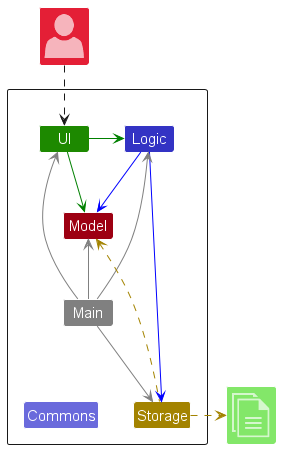
The Architecture Diagram given above explains the high-level design of AbsolutSin-ema, a specialized contact management application designed for party planners to manage vendors, clients, and events efficiently.
AbsolutSin-ema is built on a dual-entity system that manages both Persons (vendors/clients) and Events (parties) with sophisticated relationship management, budget tracking, and assignment capabilities.
Core Design Principles
- Domain-Specific Design: Built specifically for party planning with vendor management, budget tracking, and event-person assignments
- Dual-Entity Architecture: Separate but interconnected management of Persons and Events
- Budget-Aware Operations: All assignments and operations consider budget constraints
- Robust Relationship Management: PersonId system ensures data integrity across relationships
- Command-Driven Workflow: CLI-first design optimized for power users
Main Components
Main (consisting of classes Main and MainApp) handles app launch and shutdown:
- Initializes components in correct sequence and connects them
- Manages application lifecycle and graceful shutdown
- Handles configuration and logging initialization
The application’s core functionality is delivered through four main components:
UI: The user interface layerLogic: Command processing and business logicModel: Data models and business rulesStorage: Data persistence and retrieval
Commons provides shared utilities used across components.
Component Interaction
The Sequence Diagram below shows how the components interact for the command delete 1:
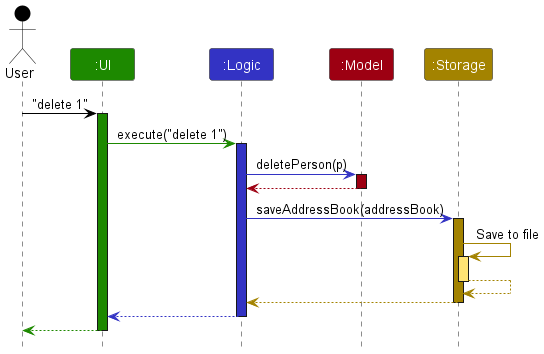
Each component:
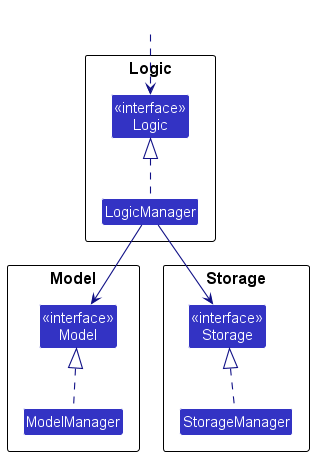
- Defines its API in an
interfacewith the same name as the Component - Implements functionality using a concrete
{Component Name}Managerclass - Interacts with other components through interfaces to maintain loose coupling
Component Details
UI Component
API: Ui.java
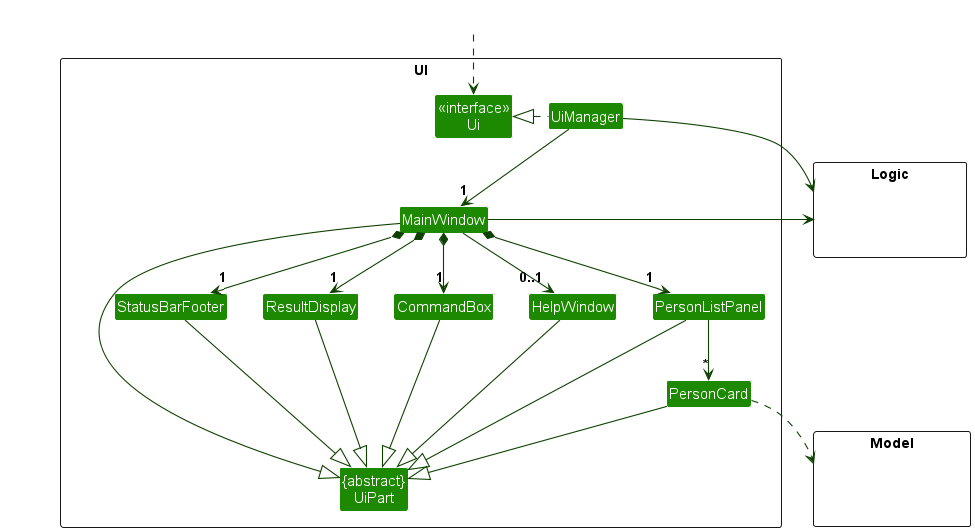
The UI consists of a MainWindow containing specialized components:
Core UI Components:
CommandBox: Handles CLI input with validation and auto-completion hintsResultDisplay: Shows command results and error messagesPersonListPanel: Displays vendor/client contacts with tags and budget infoEventListPanel: Shows events/parties with participant counts and budget statusStatusBarFooter: Displays application state and file save statusHelpWindow: Comprehensive help system with scrollable command reference
Key UI Features:
- Dual-panel design: Separate views for persons and events
- Budget visualization: Color-coded budget indicators in both panels
- Tag-based filtering: Visual tag representation for quick identification
- Real-time updates: Observable list bindings ensure immediate UI updates
- Responsive layout: Adapts to different screen sizes and window states
The UI uses JavaFX framework with FXML layouts stored in src/main/resources/view. Each UI component inherits from UiPart<T> which provides common functionality for GUI elements.
Logic Component
API : Logic.java
Here’s the class diagram of the Logic component:
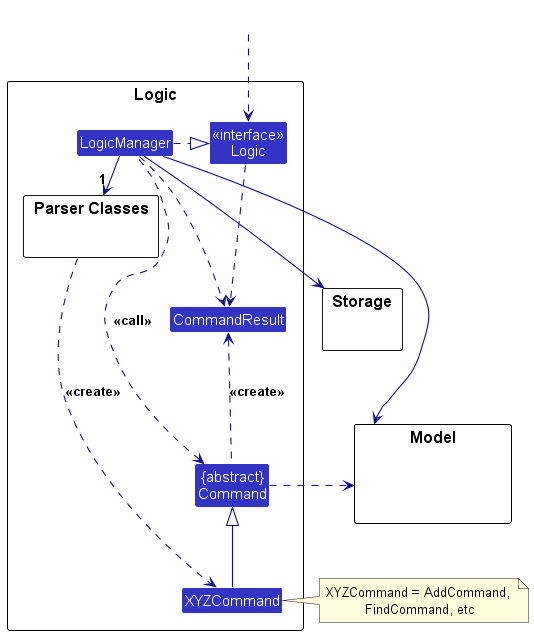
Command Processing Flow:
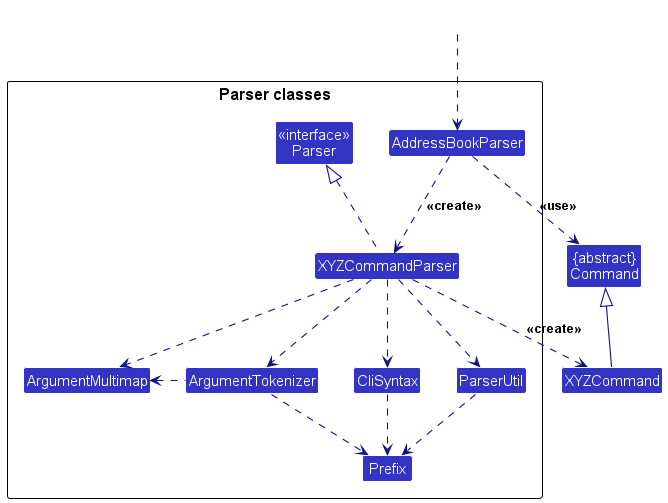
LogicManagerreceives user input and delegates toAddressBookParserAddressBookParsercreates appropriateXYZCommandParserbased on command word- Parser validates input and creates
XYZCommandobject LogicManagerexecutes command withModelinteraction- Command returns
CommandResultwith success/error information
Specialized Parsers:
AddEventCommandParser: Handles complex event creation with optional contact assignmentsAssignContactToEventCommandParser: Manages bulk contact-to-event assignments with budget validationFindCommandParser: Supports both name and tag-based searchingEditCommandParser/EditEventCommandParser: Handle partial updates with validation
Advanced Features:
- Budget validation: Commands validate budget constraints before execution
- Undo system: Commands save state for undo functionality via
model.saveStateForUndo() - Index validation: Robust checking of user-provided indexes against current filtered lists
- Confirmation flows: Multi-step commands like
clearrequire confirmation
Model Component
API: Model.java
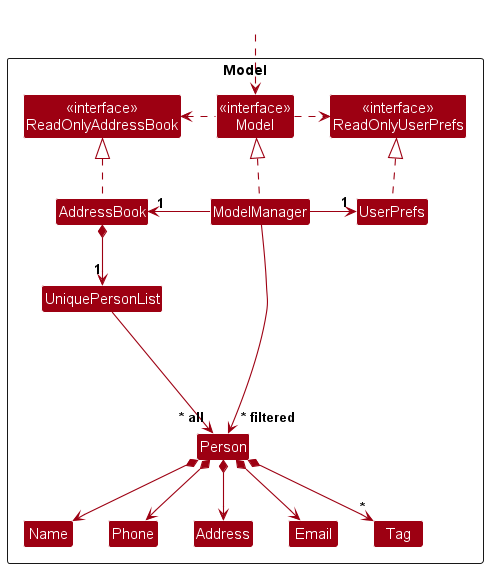
Core Model Classes:
AddressBook: Central data container managing both persons and events
UniquePersonList: Maintains person data with duplicate preventionUniqueEventList: Manages events with name-based uniqueness checking- Deep copying mechanisms for undo functionality
Person: Represents vendors/clients with specialized fields
PersonId: Unique identifier for relationship managementName,Phone,Email: Standard contact informationWebsite: Vendor-specific field for online presenceBudget: Vendor service cost for budget calculationsSet<Tag>: Flexible categorization system
Event: Represents parties/gatherings with comprehensive management
EventName,EventDate,EventTime: Basic event informationList<PersonId>: Participants assigned to the eventBudget initialBudget: Total budget allocated for the eventBudget remainingBudget: Budget remaining after assignments
Advanced Model Features:
- Budget Management System:
// Budget validation during assignment if (eventBudget < personBudget) { throw new CommandException("Budget exceeded"); } remainingBudget = eventBudget - personBudget; - Relationship Integrity:
// PersonId ensures referential integrity List<PersonId> participants = event.getParticipants(); // Relationships persist across person edits - Observable Lists:
ObservableList<Person> getFilteredPersonList();
ObservableList<Event> getFilteredEventList();
// UI automatically updates when data changes
The Model is completely independent of UI and Storage components, following clean architecture principles.
Storage Component
API: Storage.java
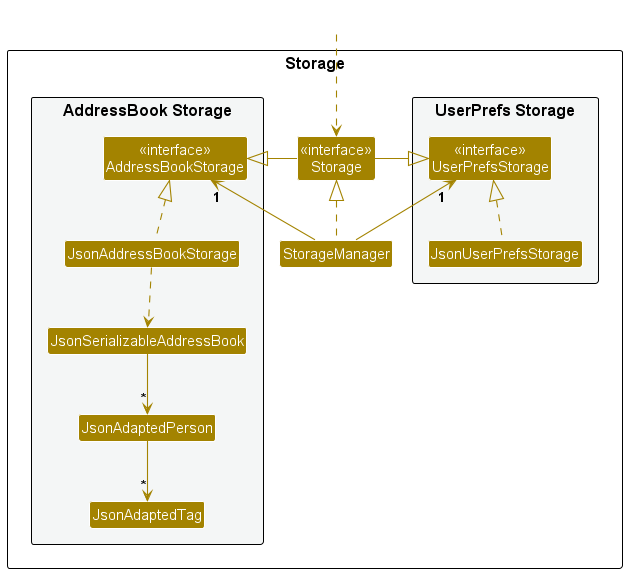
Storage Architecture:
StorageManager: Coordinates between AddressBook and UserPrefs storageJsonAddressBookStorage: Persists dual-entity data in JSON formatJsonUserPrefsStorage: Manages user preferences and settings
JSON Adapters:
JsonAdaptedPerson: Serializes Person objects with PersonId preservationJsonAdaptedEvent: Handles Event serialization with participant relationshipsJsonAdaptedTag: Manages tag serializationJsonSerializableAddressBook: Root container for complete data export/import
Key Storage Features:
- Automatic Saving: Data persists after every state-changing command
- Graceful Recovery: Handles corrupted files by clearing data
- Relationship Preservation: PersonId references maintained across sessions
- User Preferences: Window size, position, and view preferences saved
Common classes
Classes used by multiple components are in the seedu.address.commons package. These include:
LogsCenter: Handles application-wide logging functionalityConfig: Manages application configuration settingsMessages: Contains common message templates and constantsJsonUtil: Provides JSON serialization and file I/O utilitiesStringUtil: Common string manipulation and validation helpersAppUtil: General application utilities and argument validation
Implementation
This section describes noteworthy implementation details of key features.
Budget Management System
Overview
AbsolutSin-ema implements sophisticated budget tracking for both individual vendors and events. This system ensures financial constraints are respected when assigning vendors to events.
Budget Components:
Budgetclass: Validates and stores monetary values- Event budget tracking: Initial vs. remaining budget separation
- Person budget: Service cost for vendor assignments
Budget Validation Algorithm:
public void validateAssignment(Person person, Event event) {
    double personCost = Double.parseDouble(person.getBudget().value);
    double remainingBudget = Double.parseDouble(event.getRemainingBudget().value);

    if (remainingBudget < personCost) {
        throw new CommandException("Budget exceeded");
    }
}
Budget Updates: When assigning contacts to events, the system:
- Validates each person’s cost against remaining budget
- Updates remaining budget after successful assignment
- Prevents over-budget assignments
- Maintains budget history for undo operations
Design Considerations
- Alternative 1 (current choice): Real-time budget validation
- Pros: Immediate feedback, prevents budget violations
- Cons: More complex assignment logic
- Alternative 2: Post-assignment budget checking
- Pros: Simpler implementation
- Cons: Could allow budget violations
Event-Person Assignment System
Overview
The assignment system manages complex relationships between vendors and events with budget constraints and participant tracking.
The following sequence diagram shows how the assign command works when a user executes assign 1 c/2,3:
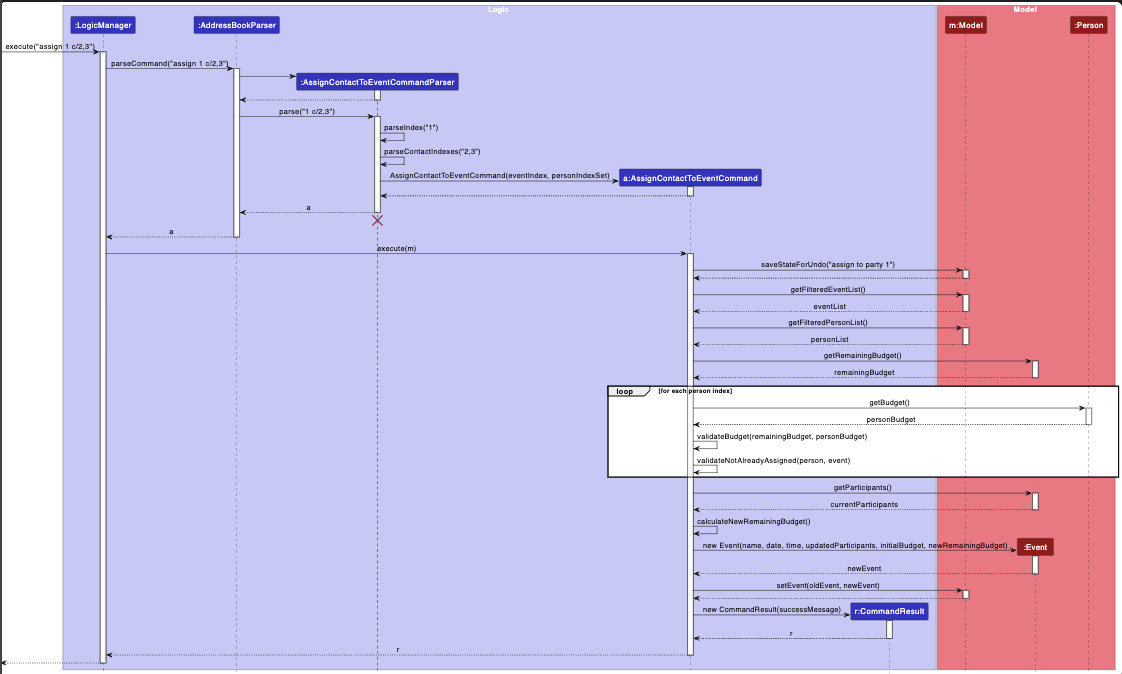
Assignment Command Flow:
AssignContactToEventCommandreceives event index and person indexes- Validates all indexes against current filtered lists
- Checks for existing assignments to prevent duplicates
- Validates budget constraints for each assignment
- Updates event with new participants and adjusted budget
- Saves state for undo functionality
Key Implementation Details:
// Collect and validate persons with budget checking
private List<Person> collectAndValidatePersons(List<Person> lastShownList,
        Event eventToModify, double eventBudget) throws CommandException {
    List<Person> result = new ArrayList<>();
    for (Index i : assignedPersonIndexList) {
        Person personToAdd = lastShownList.get(i.getZeroBased());
        double personBudget = parseBudgetSafe(personToAdd.getBudget().value);

        if (eventBudget < personBudget) {
            throw new CommandException("Budget exceeded for " + personToAdd.getName());
        }
        eventBudget -= personBudget;
        result.add(personToAdd);
    }
    return result;
}
Assignment Features:
- Bulk assignment: Multiple contacts in single command (
assign 1 c/2,3,4) - Budget validation: Automatic checking during assignment
- Duplicate prevention: Cannot assign same person multiple times
- State preservation: Full undo support for assignments
Undo System Implementation
Overview
AbsolutSin-ema implements a state-saving undo system that captures application state before destructive operations.
State Management:
// Before executing state-changing command
model.saveStateForUndo("description of operation");

// Execute operation
performOperation();

// Undo restores previous state
model.undo(); // Restores to saved state
Undo-Capable Commands:
- Person management:
add,delete,edit,clear - Event management:
addp,deletep,editp - Assignments:
assign,unassign
State Saving Strategy:
- Deep copy of entire AddressBook before modification
- Operation description for user feedback
- Single-level undo (most recent operation only)
Design Considerations
- Current Implementation:
- Pros: Simple and reliable
- Cons: Memory intensive for large datasets
- Alternative Approach: Command-specific undo
- Pros: Memory efficient
- Cons: Complex implementation, higher error potential
Search and Filter System
Overview
Advanced search capabilities supporting both name-based and tag-based filtering across persons and events.
Search Components:
FindCommand: Unified search across name and tag fieldsNameAndTagContainsKeywordsPredicate: Advanced filtering logic- Real-time result updates in UI
Event Management System
The event management system allows party planners to create and manage events (parties), track budgets, and assign contacts (vendors/clients) to specific events. This feature is fully integrated with the person management system.
Key Components:
- Event Entity (
seedu.address.model.event.Event)- Stores event details:
EventName,EventDate,EventTime - Manages budgets:
initialBudgetandremainingBudget - Tracks participants via a list of
PersonIdreferences - Implements
isSameEvent()method to prevent duplicate events
- Stores event details:
- Event Commands:
AddEventCommand(addp) - Creates a new event with name, date, time, and budgetEditEventCommand(editp) - Modifies existing event detailsDeleteEventCommand(deletep) - Removes an event from the systemAssignContactToEventCommand(assign) - Links one or more contacts to an event as participants (format:assign EVENT_INDEX c/CONTACT_INDEXES)UnassignContactFromEventCommand(unassign) - Removes one or more contacts from an event (format:unassign EVENT_INDEX c/CONTACT_INDEXES)ViewCommand(view) - Displays all participants for a specific event
- Budget Tracking:
- Each event tracks both initial and remaining budget
- Each person (vendor) has an associated budget cost
- When a person is assigned to an event, the remaining budget can be adjusted
- Budget validation ensures sufficient funds are available
- UI Components:
EventListPanel- Displays all events in the systemEventListCard- Shows individual event details including name, date, time, and budget
How Event-Person Association Works:
Events don’t store full Person objects, but rather PersonId references. This design:
- Prevents data duplication
- Ensures person updates automatically reflect in associated events
- Allows efficient querying of participants via
Model#getPersonById(PersonId)
Example Usage Scenario:
- Party planner creates a new birthday party:
addp n/Birthday Party d/2024-12-25 t/18:00 b/5000 - System creates event with $5000 budget
- Planner assigns caterer to event:
assign 1 c/1(assigns contact at index 1 to event at index 1) - Planner can assign multiple contacts at once:
assign 1 c/2,3,4(assigns contacts 2, 3, and 4 to event 1) - Planner can view all vendors/participants:
view 1 - If needed, planner can unassign:
unassign 1 c/1(removes contact 1 from event 1)
Confirmation System for Destructive Operations
To prevent accidental data loss, the application implements a confirmation system for the clear all
command, which deletes all contacts and parties, the clear parties command, which deletes only parties,
and the clear contacts, which deletes only contacts respectively.
How it works:
- When user executes a clear command, the
ClearCommanddisplays a warning message (one of):- “Are you sure you want to clear the party planner? (Type ‘y’ to confirm, ‘n’ to cancel)” (clear all)
- “Are you sure you want to clear all contacts? (Type ‘y’ to confirm, ‘n’ to cancel)” (clear contacts)
- “Are you sure you want to clear all parties? (Type ‘y’ to confirm, ‘n’ to cancel)” (clear parties)
- User must type
yto confirm ornto cancel the operation. - If confirmed, the
ConfirmClearCommandperforms the actual data deletion and shows one of:- “Address book has been cleared!”
- “Contacts have been cleared!”
- “Parties have been cleared!”
- If cancelled, the operation is aborted and no data is lost.
The commands clear contacts and clear parties work similarly, but just with different warning messages in step 1
that refer to what they are deleting (contacts for clear contacts and parties for clear parties).
Design Rationale:
- Destructive operations like
clear all,clear contacts, andclear partiescan be fatal (even with undo, losing all data is risky) - Interactive confirmation with explicit yes/no response provides a strong safety net
- The confirmation message clearly explains what will happen and how to proceed
- User-friendly prompts reduce the chance of accidental data loss from typos or misclicks
- Could be extended to other dangerous operations (e.g., bulk delete) in future versions
[Proposed] Data archiving
Search Algorithm:
public boolean test(Person person) {
    // Name matching (case-insensitive)
    boolean nameMatch = keywords.stream()
        .anyMatch(keyword -> StringUtil.containsWordIgnoreCase(
            person.getName().fullName, keyword));

    // Tag matching
    boolean tagMatch = person.getTags().stream()
        .anyMatch(tag -> keywords.stream()
            .anyMatch(keyword -> StringUtil.containsWordIgnoreCase(
                tag.tagName, keyword)));

    return nameMatch || tagMatch;
}
Search Features:
- Multi-keyword support:
find john caterermatches name OR tag - Case-insensitive matching
- Partial word matching
- Tag-specific searching:
find caterershows all caterers - Real-time filtering with immediate UI updates
Documentation, logging, testing, configuration, dev-ops
Appendix: Requirements
Product scope
Target user profile:
AbsolutSin-ema targets professional party planners who:
- Organize multiple events simultaneously (birthdays, anniversaries, corporate events)
- Manage extensive vendor networks (caterers, decorators, entertainers, venues)
- Track budgets across multiple projects
- Need quick access to vendor information during planning
- Prefer efficient CLI tools over slower GUI applications
- Handle time-sensitive vendor assignments and budget allocations
Value proposition: AbsolutSin-ema helps party planners manage their contacts more efficiently than generic contact management apps by:
AbsolutSin-ema provides party planners with:
- Specialized vendor management: Custom fields (website, budget) for vendor-specific needs
- Integrated event planning: Connect vendors to specific events with budget tracking
- Budget control: Real-time budget validation prevents overspending
- Efficient workflow: CLI commands optimized for rapid data entry and retrieval
- Relationship management: Track which vendors work on which events
- Professional organization: Tag-based categorization for vendor specialties
User stories
Priorities: High (must have) - * * *, Medium (should have) - * *, Low (nice to have) - *
| Priority | As a… | I want to… | So that I can… |
|---|---|---|---|
* * * |
party planner | add vendor contacts | contact the vendor |
* * * |
party planner | add vendor contacts with budget info | track service costs for budget planning |
* * * |
party planner | create events with budgets | manage individual party finances |
* * * |
party planner | assign vendors to specific events | organize who’s working on each party |
* * * |
party planner | see budget validation during assignments | avoid overspending on events |
* * * |
party planner | view all vendors and events in one app | have centralized party planning management |
* * * |
party planner | delete individual vendor contacts | remove outdated or incorrect vendor information |
* * * |
party planner | delete individual events | remove cancelled or completed parties from my list |
* * |
busy party planner | quickly find vendors by specialty tags | locate appropriate services for specific party themes |
* * |
party planner | edit vendor and event information | keep information current as details change |
* * |
party planner | see confirmation before deleting data | prevent accidental loss of important vendor information |
* * |
party planner | clear all contacts at once | reset my contact list when starting fresh |
* * |
party planner | clear all parties at once | clean up after event season without affecting contacts |
* * |
party planner | clear all data (contacts and parties) | completely reset the application when needed |
* * |
party planner | undo recent changes | recover from mistakes during rapid data entry |
* * |
new user | access comprehensive help | learn the system quickly without external documentation |
* |
experienced planner | assign multiple vendors to events at once | speed up event setup for large parties |
* |
budget-conscious planner | see remaining budget for each event | make informed vendor selection decisions |
* |
organized planner | export vendor and event data | create reports or backup information |
* |
collaborative planner | share vendor lists with team members | coordinate with assistants and partners |
Use cases
(For all use cases below, the System is AbsolutSin-ema and the Actor is the Party Planner)
Use case UC01: Add specialized vendor with budget
MSS
- Planner enters
add n/Elite Catering p/91234567 e/info@elite.com w/www.elite.com t/caterer t/halal b/150 - System validates all required fields, ensuring the name is unique and the budget format is correct.
- System creates a new vendor entry with a unique PersonId.
- System displays a success message with the new vendor’s details.
-
System updates the vendor list displayed in the UI.
Use case ends.
Extensions
- 2a. Duplicate vendor name detected.
- 2a1. System shows error message “This person already exists in the address book”.
- Use case ends.
- 2b. Invalid budget format.
- 2b1. System shows “Budget should only contain numbers, and it should be at least 0.”
- 2b2. Planner corrects input.
- Use case resumes at step 1.
- 2c. Invalid contact field (phone, email, website):
- 2c1. System shows specific error message for the invalid field (e.g., “Phone numbers should only contain numbers, and it should be at least 3 digits long”).
- 2c2. Planner corrects input.
- Use case resumes at step 1.
Use case UC02: Create event and assign vendors with budget validation
MSS
- Planner enters
addp n/Sarah's Birthday d/15-12-2024 t/19:00 b/500 c/1,3,5 - System validates event details and contact indexes.
- System retrieves vendor costs for contacts 1, 3, and 5.
- System validates total vendor costs (150+100+75=325) against event budget (500).
- System creates event with assigned vendors.
- System updates event remaining budget to 175 (500-325).
- System displays success message with event and assignment details.
-
System updates the event list displayed in the UI.
Use case ends.
Extensions
- 2a. Vendor costs exceed event initial budget:
- 2a1. System shows an error message (e.g., “The total budget of assigned vendors exceeds the event’s initial budget.”).
- Use case ends, no event created.
- 2b. Invalid contact index provided:
- 2b1. System shows an error message (e.g., “The person index provided is invalid”).
- Use case ends, no event created.
- 2c. Invalid event detail format (date, time, budget):
- 2c1. System shows specific error message for the invalid field.
- 2c2. Planner corrects input
- Use case resumes at step 1.
- 2d. Duplicate event name:
- 2d1. System shows error message “This event already exists in the address book”.
- Use case ends.
Use case UC03: Assign additional vendors to existing event
MSS
- Planner views the event list and identifies the target event (e.g., at index 2).
- Planner enters
assign 2 c/4,7 - System retrieves the event at the specified index and its current remaining budget.
- System retrieves the service costs for vendors 4 and 7, and validates them against the event’s remaining budget.
- System checks that vendors 4 and 7 are not already assigned to this event.
- System updates the event’s participant list and adjusts its remaining budget.
- System displays a success message with the assigned vendor names.
-
System updates the event list displayed in the UI.
Use case ends.
Extensions
- 2a. Invalid event index:
- 2a1. System shows error message “The event index provided is invalid”.
- 2a2. Use case ends.
- 2b. Invalid vendor index:
- 2b1. System shows error message “The person index provided is invalid”.
- 2b2. Use case ends.
- 4a. Insufficient remaining budget
- 4a1. System shows “The budget of {vendor} exceeds the remaining budget of the party.”
- Use case ends, no assignments made.
- 5a. Vendor already assigned to event.
- 5a1. System shows “{vendor} has already been assigned to this party.”
- Use case ends.
Use case UC04: Search vendors by specialty/name and assign to event
MSS
- Planner enters
find photographerto locate photographers. - System filters vendor list showing only vendors whose names or tags contain “photographer”.
- Planner reviews filtered list and identifies suitable vendors (e.g., at index 2 in the filtered list).
- Planner enters
assign 1 c/2to assign photographer at index 2 to event 1. - System validates assignment (including budget checks) and updates the event’s participant list and remaining budget.
- System displays a success message with the assigned vendor’s name and event details.
-
Planner enters
listto return to full vendor viewUse case ends.
Extensions
- 1a. Planner searches by multiple keywords (name or tag): find caterer halal
- 1a1. System filters the vendor list, showing vendors matching “caterer” OR “halal”.
- Use case continues from step 3.
- 2a. No photographer found
- 2a1. System shows “0 persons listed!”
- Use case ends
- 5a. Assignment fails due to budget constraints:
- 5a1. System shows “The budget of {vendor} exceeds the remaining budget of the party.”
- Use case ends, no assignment is made.
- 5b. Assignment fails due to invalid event or vendor index:
- 5b1. System shows an appropriate error message (e.g., “The event index provided is invalid” or “The person index provided is invalid”).
- Use case ends, no assignment is made.
Use case UC05: Edit vendor information.
MSS
- Planner identifies the vendor to edit (e.g., at index 1).
- Planner enters
edit 1 p/87654321 b/250 - System validates the new information (e.g., phone number format, budget value).
- System updates the vendor’s details.
- System displays a success message confirming the changes.
-
System updates the vendor list displayed in the UI.
Use case ends
Extensions
- 2a. Invalid vendor index:
- 2a1. System shows error message “The person index provided is invalid”.
- Use case ends.
- 3a. Invalid format for any field:
- 3a1. System shows specific error message for the invalid field.
- Use case ends, no changes are made to the vendor.
Use case UC06: Delete a vendor
MSS
- Planner identifies the vendor to delete (e.g., at index 1).
- Planner enters
delete 1 - Planner confirms deletion(UC15)
- System removes the vendor from the address book.
- System displays a success message confirming the deletion.
-
System updates the vendor list displayed in the UI.
Use case ends.
Extensions
- 2a. Invalid vendor index:
- 2a1. System shows error message “The person index provided is invalid”.
- Use case ends.
Use case UC07: List all vendors
MSS
- Planner enters
list -
System displays an unfiltered list of all vendors in the UI.
Use case ends.
Extensions
- 2a. No vendors exist in the system:
- 2a1. System displays message “0 persons listed!”.
- Use case ends.
Use case UC08: Edit event information
MSS
- Planner identifies the event to edit (e.g., at index 1).
- Planner enters
editp 1 n/Wedding Reception d/26-06-2025 b/3000 - System validates the new event details.
- System updates the event’s information, including recalculating remaining budget if the initial budget changed and re-validating against assigned vendor costs.
- System displays a success message confirming the changes.
-
System updates the event list displayed in the UI.
Use case ends.
Extensions
- 2a. Invalid event index:
- 2a1. System shows error message “The event index provided is invalid”.
- Use case ends.
- 3a. Invalid format for any field (date, time, budget):
- 3a1. System shows specific error message for the invalid field.
- Use case ends, no changes are made to the event.
- 4a. New initial budget is less than total assigned vendor costs:
- 4a1. System shows error message “The new budget is less than the total cost of currently assigned vendors.”
- Use case ends, no changes are made.
Use case UC09: Delete an event
MSS
- Planner identifies the event to delete (e.g., at index 1).
- Planner enters
deletep 1 - Planner confirms deletion(UC16).
- System removes the event from the address book.
- System displays a success message confirming the deletion.
-
System updates the event list displayed in the UI.
Use case ends.
Extensions
- 2a. Invalid event index:
- 2a1. System shows error message “The event index provided is invalid”.
- Use case ends.
Use case UC10: View event participants
MSS
- Planner identifies the event (e.g., at index 1).
- Planner enters
view 1 -
System displays a detailed view of Event 1, including its name, date, time, budget, and a list of all assigned vendors (PersonId to Name/details).
Use case ends.
Extensions
- 2a. Invalid event index:
- 2a1. System shows error message “The event index provided is invalid”.
- Use case ends.
- 3a. No vendors assigned to the event:
- 3a1. System displays event details and message “No vendors assigned to this event.”
- Use case ends.
Use case UC11: List all events
MSS
- Planner enters
listp -
System displays an unfiltered list of all events in the UI.
Use case ends.
Extensions
- 2a. No events exist in the system:
- 2a1. System displays message “0 events listed!”.
- Use case ends.
Use case UC12: Unassign contact from event
MSS
- Planner identifies the event and the vendors to unassign (e.g., event index 1, contacts at index 2 and 3).
- Planner enters
unassign 1 c/2,3 - System retrieves the event and the specified vendors.
- System removes vendors 2 and 3 from the event’s participant list.
- System adjusts the event’s remaining budget by adding back the unassigned vendors’ costs.
- System displays a success message confirming the unassignment.
-
System updates the event list displayed in the UI.
Use case ends.
Extensions
- 2a. Invalid event index:
- 2a1. System shows error message “The event index provided is invalid”.
- Use case ends.
- 2b. Invalid vendor index:
- 2b1. System shows error message “The person index provided is invalid”.
- Use case ends.
- 4a. Vendor not assigned to the event:
- 4a1. System shows message “{vendor} is not assigned to this party.”
- Use case ends.
Use case UC13: Undo recent operation
MSS
- Planner performs a state-changing command (e.g., add, delete, assign).
- Planner enters
undo - System restores the application state to reflect the state before the last command was executed.
- System displays a success message (e.g., “Undid {description of undone operation}”).
-
System updates the UI to reflect the restored state.
Use case ends.
Extensions
- 2a. No previous operation to undo:
- 2a1. System shows error message “There is no command to undo!”.
- Use case ends.
Use case UC14: Clear all data with confirmation
MSS
- Planner enters
clear all - System displays a warning message: “Are you sure you want to clear the party planner? (Type ‘y’ to confirm, ‘n’ to cancel)”.
- Planner enters y to confirm.
- System deletes all vendors and events.
- System displays a success message “Address book has been cleared!”.
-
System updates the UIs (vendor list and event list) to be empty.
Use case ends.
Extensions
- 3a. Planner enters n to cancel:
- 3a1. System displays “Operation cancelled.”
- Use case ends, no data is deleted.
- 3b. Planner enters an invalid input (neither ‘y’ nor ‘n’):
- 3b1. System re-prompts for confirmation.
- Use case resumes at step 3.
Use case UC15: Clear only contacts with confirmation
MSS
- Planner enters
clear contacts - System displays a warning message: “Are you sure you want to clear all contacts? (Type ‘y’ to confirm, ‘n’ to cancel)”.
- Planner enters y to confirm.
- System deletes all contact/vendor entries.
- System displays a success message “All contacts have been cleared!”.
-
System updates the vendor list in the UI to be empty.
Use case ends.
Extensions
- 3a. Planner enters n to cancel:
- 3a1. System displays “Operation cancelled.”
- Use case ends, no contacts are deleted.
- 3b. Planner enters an invalid input (neither ‘y’ nor ‘n’):
- 3b1. System re-prompts for confirmation.
- Use case resumes at step 3.
Use case UC16: Clear only events with confirmation
MSS
- Planner enters
clear parties - System displays a warning message: “Are you sure you want to clear all parties? (Type ‘y’ to confirm, ‘n’ to cancel)”.
- Planner enters y to confirm.
- System deletes all event entries.
- System displays a success message “All parties have been cleared!”.
-
System updates the event list in the UI to be empty.
Use case ends.
Extensions
- 3a. Planner enters n to cancel:
- 3a1. System displays “Operation cancelled.”
- Use case ends, no events are deleted.
- 3b. Planner enters an invalid input (neither ‘y’ nor ‘n’):
- 3b1. System re-prompts for confirmation.
- Use case resumes at step 3.
Use case UC17: Find events by name
MSS
- Planner enters
findp birthday - System filters the event list to show only events whose names contain “birthday”.
-
System displays the filtered list of events in the UI.
Use case ends.
Extensions
- 2a. No events found matching the keywords:
- 2a1. System shows “0 events listed!”.
- Use case ends.
Use case UC18: Access comprehensive help
MSS
- Planner enters
help - System opens a HelpWindow displaying comprehensive instructions, command formats, and examples.
-
The HelpWindow is scrollable and allows the planner to navigate through the help content.
Use case ends.
Non-Functional Requirements
Performance Requirements
- Command execution should complete within 2 seconds on a standard desktop
- Application should handle up to 1000 vendors and 100 events without performance degradation
- Search results should appear within 1 second for any query
- UI updates should be immediate when data changes
Usability Requirements
- New users should successfully create vendors and events within 10 minutes using help
- Error messages should clearly indicate the problem and suggest fixes
- CLI commands should follow consistent syntax patterns
- GUI should be readable on screen resolutions from 1024x768 upward
Reliability Requirements
- Data should auto-save after every successful command
- Application should recover gracefully from corrupted data files
- Budget calculations should be accurate to 2 decimal places
- Undo functionality should reliably restore previous state
Compatibility Requirements
- Should run on Windows 10+, macOS 10.15+, and Ubuntu 18.04+
- Requires Java 17 or higher
- Should work offline without internet connectivity
- Data files should be portable across operating systems
Maintainability Requirements
- New command types should be addable without modifying existing commands
- New vendor fields should be addable through configuration
- Code should follow established design patterns for consistency
- Component interfaces should remain stable across versions
Reliability Constraints
- Budget values must always be formatted and displayed with exactly 2 decimal places
- Assigning contacts must not cause the total cost to exceed the party’s budget
- Editing a contact’s budget must not violate any party budget constraints for parties they are assigned to
- A contact cannot be assigned to multiple parties occurring at the same date and time
- Duplicate contact names are not allowed (case-insensitive comparison)
Usability Constraints
- Budget values must contain up to 7 digits with up to 2 decimal places
- Phone numbers must be between 3 to 15 digits long
- Event dates cannot be in the past (must be present or future dates)
- Search operations are case-insensitive for names and tags
- Find command treats spaces as keyword separators (not phrase search)
- Tag editing does not support cumulative addition - all existing tags must be replaced when editing
- Only one level of undo is supported (no redo functionality)
- Undo command cannot undo another undo command
Glossary
| Term | Definition |
|---|---|
| AbsolutSin-ema | The name of this party planning contact and event management application |
| Party Planner | Professional who organizes and coordinates events and parties |
| Vendor/Person/Contact | Service provider such as caterer, decorator, entertainer, venue, photographer |
| Event/Party | A planned gathering such as birthday, anniversary, wedding, corporate event |
| Assignment | The process of allocating vendors to work on specific events |
| Budget | Monetary amount allocated for vendor services or event expenses |
| Tag | Label used to categorize vendors by specialty (e.g., caterer, halal, elegant) |
| PersonId | Unique identifier ensuring data integrity across vendor-event relationships |
| CLI | Command Line Interface - text-based commands for rapid data manipulation |
| GUI | Graphical User Interface, displays contacts and events visually |
| Index | Numerical position of vendor/event in the currently displayed list |
| Service Type | Category of vendor service (caterer, DJ, venue, etc.) |
| Party Theme | Style of a party (princess, superhero, elegant, tropical) |
| MVP | Minimum Viable Product, core features needed for release |
| Remaining Budget | Event budget minus already assigned vendor costs |
| Bulk Assignment | Assigning multiple vendors to an event in a single command |
Appendix: Instructions for manual testing
Given below are instructions to test AbsolutSin-ema manually.
Launch and shutdown
- Initial launch
- Download the jar file and copy into an empty folder
- Open a command terminal,
cdinto the folder you put the jar file in, and use thejava -jar absolutsinema.jarcommand to run the application. - Expected: GUI appears with sample vendors and events. Window may not be optimally sized.
- Saving window preferences
- Resize window to a comfortable size and move to preferred location
- Close the window
- Re-launch the app by re-typing
java -jar absolutsinema.jarin the terminal - Expected: Window appears in the same size and location as before closing
Vendor management
- Adding a vendor with all fields
- Test case:
add n/John's Catering p/98765432 e/john@catering.com w/www.johnscatering.com t/caterer t/halal b/200 -
Expected: New vendor appears in list with all specified details. Success message shows vendor details.
- Test case:
add n/John's Catering p/91234567 e/different@email.com w/different.com t/caterer b/150 -
Expected: Error message: “This person already exists in the address book”.
- Test case:
add n/Invalid p/13 e/bad-email w/bad-url t/test b/-50 - Expected: Error messages for invalid phone, email, website, or negative budget.
- Test case:
- Editing vendor information
- Prerequisites: At least one vendor in the list
- Test case:
edit 1 p/87654321 b/250 -
Expected: First vendor’s phone and budget updated. Success message displays changes.
- Test case:
edit 0 n/Invalid Name - Expected: Error message indicating invalid command format (index out of bounds).
- Deleting a vendor (with confirmation)
- Prerequisites: At least one vendor
- Test case:
delete 1 - Expected: Warning dialog with message: “Are you sure you want to delete this person? (Type ‘y’ to confirm, ‘n’ to cancel)”
- Confirm in the dialog.
- Expected: Vendor 1 is removed. Success message: “Deleted Person: …”
- Listing vendors
- Test case:
list - Expected: Person list resets to all persons. Message: “Listed all persons”
- Test case:
- Listing all tags
- Test case:
listtags - Expected: If tags exist, message starts with “Listed all tags:” followed by a sorted list. If none, “No tags found in the address book.”
- Test case:
Event management
- Creating events with budget
- Test case:
addp n/Birthday Party d/25-12-2026 t/18:00 b/1000 -
Expected: New event created with specified budget. Event appears in event list. Success: “New party added: …”
- Test case:
addp n/Birthday Party d/25-12-2026 t/18:00 b/500 -
Expected: Error message: “This party already exists in the party list”
- Test case:
addp n/Wedding d/32-01-2026 t/25:00 b/abc - Expected:
- Date: “Dates should be in the format dd-MM-yyyy, must be a valid calendar date, and cannot be before today.”
- Test case:
addp n/Wedding d/30-01-2026 t/25:00 b/abc - Expected:
- Time: “Times should be in the format HH:mm”
- Test case:
addp n/Wedding d/30-01-2026 t/21:00 b/abc - Expected:
- Budget: “Budget should only contain up to 7 digits with up to 2 decimal places, and it should be at least 0.”
- Test case: create in the past (use a past date/time):
addp n/Past Party d/01-01-2020 t/00:10 b/100 - Expected: Error message: “Events cannot be scheduled in the past.”
- Test case:
- Creating events with initial vendor assignments
- Prerequisites: At least 3 vendors with known budgets
- Test case:
addp n/Corporate Event d/15-01-2027 t/14:00 b/2000 c/1,2,3 -
Expected: Event created; vendors 1, 2, 3 assigned. Remaining budget calculated correctly.
- Test case:
addp n/Small Party d/20-01-2027 t/12:00 b/100 c/1,2,3 -
Expected: Error message for exceeding budget of any contact during creation: “The budget of {Name} exceeds the remaining budget of the party.”
- Test case (concurrent assignment on same date):
- Create Event A on date D.
- Assign vendor X to Event A.
- Create Event B on the same date D (time can differ).
- Add vendor X in creation:
addp n/Event B d/<D> t/18:00 b/500 c/<index of X> - Expected: Error: “{Name} is already assigned to another party on the same date.”
- Editing event information
- Prerequisites: At least one event
- Test case:
editp 1 n/Updated Name t/19:30 -
Expected: Success: “Edited Party: …”
- Test case (no fields):
editp 1 -
Expected: Error message: “At least one field to edit must be provided.”
- Test case (move past event without changing date/time):
- If event 1 is already in the past, run:
editp 1 n/Name Only - Expected: “Events cannot be scheduled in the past. Please choose a date and time that is now or in the future.”
- If event 1 is already in the past, run:
- Test case (reduce budget below assigned sum):
- Ensure event 1 has participants with total cost S.
- Run:
editp 1 b/<S-1> - Expected: “The new budget is less than the total budget of assigned contacts.”
- Deleting an event (with confirmation)
- Prerequisites: At least one event
- Test case:
deletep 1 - Expected: Warning dialog with message: “Are you sure you want to delete this party?”
- Confirm in the dialog.
- Expected: Event 1 removed. Success message: “Deleted Party: …”
Assignment system
- Assigning vendors to events
- Prerequisites: Events and vendors exist; note remaining budget
- Test case:
assign 1 c/2,3 -
Expected: Vendors 2 and 3 assigned to event 1. Budget updated. Success message: “Assigned the following people to {Event Name}’s party: {Names}”
- Test case:
assign 1 c/2 -
Expected: If vendor 2 already assigned to event 1: “{Name} has already been assigned to this party.”
- Test case:
assign 1 c/99 -
Expected: Error message: “The person index provided is invalid Try switching to the person list view and retry.”
- Test case (duplicate prefix):
assign 1 c/2 c/3 - Expected: Error message: “Invalid command format! \nPlease only include one prefix c/!”
- Budget validation during assignment
- Prerequisites: Event with low remaining budget, and a vendor whose cost exceeds it
- Test case:
assign 1 c/5(where vendor 5’s cost > event 1 remaining budget) - Expected: Error: “The budget of {Name} exceeds the remaining budget of the party.”
- Prevent scheduling conflicts on the same date
- Prerequisites: Two events on the same date, vendor X not yet on event 2
- Assign vendor X to event 1, then run
assign 2 c/<index of X> - Expected: Error: “{Name} is already assigned to another party on the same date.”
- Unassigning vendors from events
- Prerequisites: Event 1 has assigned vendors
- Test case:
unassign 1 c/2 -
Expected: Vendor 2 removed from event 1. Remaining budget increases appropriately. Success message: “Unassigned the following people from {Event Name}’s party: {Names}”
- Test case (not assigned):
unassign 1 c/99(99 refers to a person that exists but is not assigned) -
Expected: “{Name} is not assigned to this party.”
- Test case (invalid person index in current view):
unassign 1 c/999 - Expected: “The person index provided is invalid Try switching to the person list view and retry.”
Viewing participants of an event
- Viewing
- Prerequisites: Events exist
- Test case:
view 1 -
Expected: Error message: “The event index provided is invalid.”
- Test case:
view 0 - Expected: Error message: “Invalid index for view command. Usage: view INDEX (must be a positive integer)”
Search and filter
- Finding vendors by name and tags
- Test case:
find caterer -
Expected: Shows all vendors tagged with “caterer”.
- Test case:
find john -
Expected: Shows vendors with “john” in their name.
- Test case:
find caterer photographer -
Expected: Shows vendors tagged with either “caterer” OR “photographer”. Message shows count, e.g., “2 persons listed!”
- Test case:
find nonexistent - Expected: Shows “0 persons listed!”
- Test case:
Undo functionality
- Undoing recent operations
- Prerequisites: Perform any state-changing command (add, edit, assign, etc.)
- Test case:
undo -
Expected: Previous operation reversed. Message starts with “Previous command undone: …”
- Test case:
undo(when no previous operation exists) - Expected: Error message: “No command to undo.”
Clear operations (with confirmation)
- Clear contacts only
- Test case:
clear contacts - Expected: Warning dialog: “Are you sure you want to clear all contacts? (Type ‘y’ to confirm, ‘n’ to cancel)”
- Confirm in the dialog.
- Expected: Message: “Contacts have been cleared!” and the contacts list is empty (events remain).
- Test case:
- Clear parties only
- Test case:
clear parties - Expected: Warning dialog: “Are you sure you want to clear all parties? (Type ‘y’ to confirm, ‘n’ to cancel)”
- Confirm in the dialog.
- Expected: Message: “Parties have been cleared!” and the events list is empty (contacts remain).
- Test case:
- Clear all data
- Test case:
clear all - Expected: Warning dialog: “Are you sure you want to clear the party planner? (Type ‘y’ to confirm, ‘n’ to cancel)”
- Confirm in the dialog.
- Expected: Message: “Address book has been cleared!” and both lists are empty.
- Test case:
Data persistence
- Handling corrupted data files
- Exit the application
- Edit the JSON data file and introduce syntax errors
- Restart the application
- Expected: Invalid data file popup appears, application starts with cleared data
- Data saving verification
- Make several valid changes (add vendors, create parties, assignments)
- Exit and restart application
- Expected: All changes preserved exactly as made.
- Invalid command formats
- Test case:
add(missing parameters) -
Expected: Error: “Invalid command format!” followed by usage for
add. - Test case:
assign(missing parameters) - Expected: Error: “Invalid command format!” followed by usage for
assign.- For contact indexes inside
c/lists, a zero value triggers: “Index is not a non-zero unsigned integer.”:
- For contact indexes inside
- Test case:
invalidcommand - Expected: Error message: “Unknown command”
- Test case:
- Index boundary testing
- Prerequisites: Note the current list sizes for vendors (N persons) and events (M events)
- Test case:
delete 0- Expected:
Invalid command format!
delete: Deletes the person identified by the index number used in the displayed person list.
Parameters: INDEX (must be a positive integer)
Example: delete 1
- Expected:
- Test case:
delete Xwhere X > N (exceeds person list size)- Expected: “The person index provided is invalid”
- Test case:
deletep 0- Expected:
Invalid command format!
deletep: Deletes the party identified by the index number used in the displayed party list.
Parameters: INDEX (must be a positive integer)
Example: deletep 1
- Expected:
- Test case:
deletep Ywhere Y > M (exceeds event list size)- Expected: “The event index provided is invalid”
- Test case:
assign 0 c/1- Expected:
Invalid command format!
assign: Assigns one or more contacts to a specific party.
Parameters: PARTY_INDEX (must be a positive integer) c/CONTACT_INDEX[,CONTACT_INDEX...]
Example: assign 1 c/2,3
- Expected:
- Test case:
assign 1 c/0- Expected: “Index is not a non-zero unsigned integer.”
- Test case:
assign Y c/1where Y > M (exceeds event list size)- Expected: “The event index provided is invalid”
- Test case:
assign 1 c/Xwhere X > N (exceeds person list size)- Expected: “The person index provided is invalid Try switching to the person list view and retry.”
Help and exit
- Help window
- Test case:
help - Expected: Help window opens. Message: “Opened help window.”
- Test case:
- Exit
- Test case:
exit - Expected: Application closes.
- Test case:
These test cases cover the major functionality of AbsolutSin-ema. Testers should also explore edge cases, rapid command sequences, and integration scenarios to ensure robust operation.
Appendix: Effort
Overview
Developing AbsolutSin-ema required significant effort beyond the base AddressBook-Level3 project. The application evolved from a simple contact manager to a sophisticated dual-entity system designed specifically for party planning professionals.
Major Enhancements
1. Dual-Entity Architecture (High Effort)
Challenge: Extending from single-entity (Person) to dual-entity (Person + Event) system Implementation Effort:
- Created complete Event model with EventName, EventDate, EventTime classes
- Developed UniqueEventList with duplicate detection and management
- Modified AddressBook to handle both entities simultaneously
- Updated Storage layer to persist both entities in JSON format
- Enhanced UI to display both persons and events effectively
Lines of Code: ~800 additional lines across model, storage, and UI layers
2. Event-Person Relationship Management (High Effort)
Challenge: Creating robust many-to-many relationships between vendors and events Implementation Effort:
- Designed PersonId system for stable relationship references
- Built assignment commands (assign/unassign) with bulk operations
- Implemented relationship integrity checks and validation
- Created participant tracking within events
- Developed UI components to display relationships
Complexity: Managing bidirectional relationships while maintaining data integrity required careful design and extensive testing.
3. Budget Management System (Medium-High Effort)
Challenge: Real-time budget tracking and validation across assignments Implementation Effort:
- Added Budget class with validation and arithmetic operations
- Implemented budget constraint checking in assignment commands
- Created remaining budget calculations for events
- Built budget visualization in UI components
- Added budget-aware error handling and user feedback
Critical Feature: Budget validation prevents overspending and is core to the party planning domain.
4. Advanced Command System (Medium Effort)
Challenge: Extending basic CRUD to domain-specific operations Implementation Effort:
- Built AddEventCommand with optional bulk assignment
- Created AssignContactToEventCommand with sophisticated validation
- Developed confirmation system for destructive operations (ConfirmClearCommand)
- Enhanced search to work across both names and tags
- Added undo system with state preservation
Domain Integration: Commands specifically designed for party planning workflows.
5. Enhanced User Interface (Medium Effort)
Challenge: Adapting UI for dual-entity display and specialized workflows Implementation Effort:
- Created EventListPanel with participant count display
- Enhanced PersonListPanel with budget and website information
- Developed budget status indicators and color coding
- Built responsive layout handling for both entity types
- Added comprehensive help system with scrollable reference
Technical Challenges Overcome
1. JSON Serialization Complexity
- Challenge: Serializing PersonId references and maintaining relationships
- Solution: Custom JSON adapters with careful ID preservation
- Effort: Multiple iterations to ensure data integrity across sessions
2. Observable List Management
- Challenge: Maintaining UI responsiveness with dual filtered lists
- Solution: Proper JavaFX binding and update mechanisms
- Effort: Required deep understanding of JavaFX observable patterns
3. Command Parser Extension
- Challenge: Adding complex command syntax while maintaining consistency
- Solution: Extended parser framework with new prefix types and validation
- Effort: Careful design to maintain backward compatibility
4. Budget Arithmetic Precision
- Challenge: Ensuring accurate financial calculations
- Solution: Robust number parsing and validation with proper error handling
- Effort: Multiple test scenarios to ensure calculation accuracy
Quantitative Metrics
- Total Java Files: 108 (significant increase from base project)
- New Model Classes: 15+ (Event hierarchy, PersonId, Budget)
- New Commands: 8 (AddEvent, AssignContact, UnassignContact, etc.)
- New UI Components: 5 (EventListPanel, enhanced displays)
- Test Coverage: Comprehensive unit and integration tests
Team Coordination Effort
- Architecture Decisions: Multiple team discussions on entity relationships
- UI/UX Design: Iterative refinement based on user feedback
- Integration Testing: Extensive testing of component interactions
- Documentation: Comprehensive developer and user guides
Comparison to AB3
| Aspect | AddressBook-Level3 | AbsolutSin-ema | Effort Multiplier |
|---|---|---|---|
| Core Entities | 1 (Person) | 2 (Person + Event) | 2x |
| Relationships | None | Many-to-many | New |
| Domain Logic | Generic | Party Planning | 3x |
| Budget System | None | Comprehensive | New |
| Command Complexity | Basic CRUD | Domain Operations | 2x |
| UI Complexity | Single list | Dual entity display | 1.5x |
Conclusion
AbsolutSin-ema represents a substantial evolution from the base project, requiring significant architectural changes, new domain modeling, and specialized user experience design. The effort invested has resulted in a professional-grade application tailored specifically for party planning workflows, demonstrating the team’s ability to transform a generic template into a domain-specific solution.
The project successfully balances feature richness with maintainability, providing a solid foundation for future enhancements while delivering immediate value to party planning professionals.